From Prompt to Production: App Builder as the Governed Layer for AI Tooling
Most teams treat Adobe Experience Cloud as a fixed set of screens. You get the UI Adobe ships, the integrations on the connector list, and not much else. When a workflow does not fit, it goes to a backlog, a consultant, or a spreadsheet.
App Builder closes that gap — and it is the part most marketing teams never touch. It gives you two things: custom UI panels embedded directly inside Experience Cloud, and an API Mesh that stitches Adobe and external services behind a single GraphQL endpoint. For AEM and Commerce customers it also covers the full extensibility spectrum — middleware connectors, core service extensions, and custom storefront or back-office experiences.
The interesting shift right now is not that AI lets one person write code faster. It is that AI collapses the cost of creating a tool to almost nothing — and App Builder collapses the cost of distributing it. That pairing is what is new. Most AI-coded tools die on someone's laptop because there is nowhere safe to land them: no hosting, no auth model, no governance story. App Builder is that landing zone — managed runtime, IMS authentication inherited from the Experience Cloud shell, deployed straight into the interface your team already has open.
To make this practical, I built a Claude Code skill — /app-builder — that scaffolds a complete App Builder project from a single conversational prompt: action registration, IMS auth, a service-appropriate UI, unit tests, and CI pipelines. Time from blank directory to a running local dev environment is under ten minutes. The bottleneck is filling in credentials, not writing code.
What App Builder Actually Is
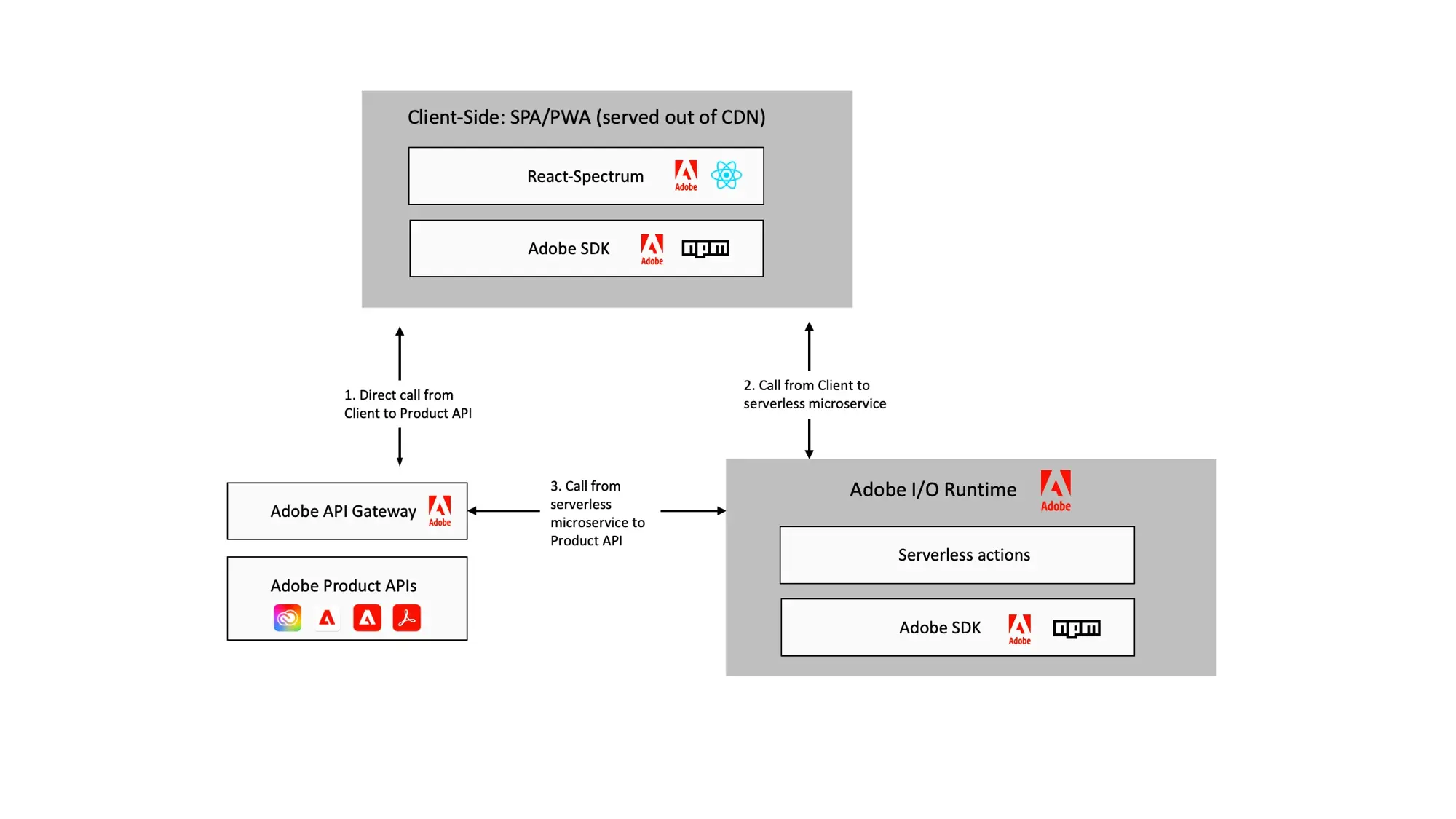
App Builder is a serverless extensibility framework running on Adobe-managed infrastructure (Adobe I/O Runtime, built on Apache OpenWhisk). You write JavaScript actions and a front-end; Adobe hosts and scales them. No VM to patch, no Kubernetes cluster to babysit, no CDN to configure.
Two capabilities matter most for Experience Cloud teams:
| Capability | What it gives you | Who it serves |
|---|---|---|
| UI Extensions | Custom panels and tools embedded directly inside the Experience Cloud shell (ExcShell) | Marketers and admins who live in Target, AJO, AEM, Analytics |
| API Mesh | A single GraphQL endpoint that stitches Adobe APIs and external services into one orchestrated layer | Commerce and engineering teams gluing systems together |
The first is about surfacing custom functionality where users already work. The second is about orchestration — making Adobe Commerce, a PIM, a loyalty system, and a third-party tax service look like one tidy API to whatever is consuming it.
Use Cases — Marketers and UI Extensions
The UI extension is the underrated half. Because it renders inside the Experience Cloud shell with real IMS credentials, you can build tools that feel native to Adobe but do exactly what your team needs.
A few patterns that land well:
- Audit and governance panels — e.g. a Target activity that maps every audience reference back to its source (Target, Audience Manager, or AEP). Practitioners stop guessing where a segment came from.
- Guided campaign setup — an opinionated form that enforces naming conventions, mandatory metadata, and approval steps before anything reaches AJO or Target.
- Cross-tool dashboards — pull live numbers from Analytics, AEP, and a downstream system into one panel, so a campaign manager is not tab-hopping across four products.
- Bulk operations — the thing the native UI makes you do one record at a time, done across hundreds with a CSV export at the end.
These are not new products. They are the small frictions that quietly tax a marketing team every week.
Use Cases — Extending AEM and the Platform
App Builder is also the primary extensibility story for AEM customers. Rather than forking the platform or waiting on product roadmaps, teams can extend in three directions:
- Middleware Extensibility — connect external systems with Adobe applications using custom connectors, or drop in pre-built integrations without touching AEM's core.
- Core Services Extensibility — add custom features and business logic on top of default application behaviour. Approval workflows, content enrichment pipelines, and custom metadata schemas are common starting points.
- User Experience Extensibility — reshape the authoring or delivery experience for specific business requirements, or build custom digital properties, storefronts, and back-office applications that sit alongside AEM.
The same pattern applies to Adobe Commerce and most of the CX Enterprise stack — if it exposes APIs, App Builder can extend it.
The Quick-Win Case
Why this works well as a deployment target for AI-scaffolded tools:
- No hosting to procure. Actions deploy to Adobe I/O Runtime; the UI deploys to Adobe's CDN. No separate cloud account, no infra ticket.
- It can reach external services. A
genericbearer-token action wrapper means you can call any non-Adobe endpoint — a notification service, a custom ML model, a partner API — and surface the result inside Experience Cloud. - It unlocks teams. A practitioner with a clear need and an AI agent can stand up a working tool without waiting on a platform team's roadmap.
- It is disposable in the right way. If a workflow stops being useful,
aio app undeployand it is gone. Low commitment is a feature.
What I Learned Building With the Skill
Having run this pattern across a few real-world builds, three things stood out.
Domain knowledge drives quality more than the code does. The skill generates a working project fast, but the output is only as good as the context you give it. Knowing how ExcShell handles routing, which permissions each API requires, and which Workspace you are deploying into is what separates something the team actually adopts from something that works on localhost and nowhere else. Naming conventions and internal processes matter as much as the code — a tool that does not fit the team's mental model does not get used.
The UI is genuinely usable in five minutes. The scaffolded front-end comes with the correct IMS auth flow, a responsive layout inside the Experience Cloud shell, and error states handled. What would take a developer half a day from scratch is ready to iterate on immediately.
Bring the API docs. The more precise the context you give the agent — actual endpoint URLs, request/response shapes, links to the specific Experience League docs — the faster the iteration loop. Giving the agent the Target Admin API reference at the start of the session cuts back-and-forth by more than half.
The Real Costs
The "ten-minute deploy" framing is true and incomplete. Standing up the first app and operating it responsibly are different things. Distributing AI-coded functionality faster also means distributing un-reviewed credential access and data egress faster.
| Effort | Reality |
|---|---|
| Initial deploy | Genuinely fast once the org is set up. The skill removes the boilerplate, not the prerequisites. |
| Developer Console setup | You need Admin Console roles, a Developer Console project, the right APIs added, and OAuth Server-to-Server credentials. First time through, this is the real time sink — not the code. |
| External hosting | App Builder removes Adobe-side hosting. Any external service you call still needs its own hosting, uptime, and security posture. The mesh does not absorb that. |
| Governance | Who owns the credentials? Who reviews what data leaves Experience Cloud through a generic action? What happens when the person who built it leaves? |
| Lifecycle | "Disposable" cuts both ways. A graveyard of half-maintained apps with live API access is a security and audit problem, not a productivity win. |
For Platform Owners: The risk with AI-scaffolded App Builder apps is not code quality — the scaffolding is consistent and testable. The risk is sprawl: a dozen actions across a dozen namespaces, each holding service credentials, none in a central register. Agree on an ownership and review model before you hand the skill to the team, not after the third app ships.
Build It, or Just Ask?
The agentic co-worker changes the decision, but does not simplify it. The real question is whether a workflow earns the cost of being codified.
High-frequency repetitive tasks belong in code. Every agentic interaction costs tokens. For a one-off query — "show me all Target activities using this audience" — a conversational agent is exactly right. For a task a marketing team runs fifty times a day, burning LLM inference on every invocation is wasteful. A serverless action is faster, cheaper, and scales without model latency. When a workflow is well-understood and runs constantly, code is the right abstraction.
Determinism is underrated. Agents handle ambiguity well. They are a poor fit when the output must always be the same given the same input — naming convention enforcement, approval gate logic, data transformation rules, compliance checks. An LLM will produce subtly different outputs across runs; a serverless action with explicit business rules will not. If variance in the output is a defect, codify it.
Some workflows need a surface that cannot be argued with. A conversational agent is personal — each user drives their own session and can prompt their way past almost any instruction. An App Builder UI extension is institutional — the same rules, guardrails, and audit trail are embedded for every user. A form with required fields cannot be talked around; a chat interface can. If the workflow involves enforced process, you need the form.
The inverse: reach for the conversational agent when the task is exploratory, one-off, or requires interpreting inputs that no static form could anticipate. That long tail of "I just need to know X" queries never justified a custom build — and now they do not need one.
Short version: build what runs at volume, must run the same way every time, or runs for many people. Converse with everything else.
Licensing
Most AEM as a Cloud Service and Adobe Commerce on cloud customers have access to App Builder as part of their existing agreement. That said, entitlements vary by contract — particularly for patterns that invoke external services at high volume or require dedicated I/O Runtime namespaces. Check before you build. It is a much easier conversation with your account team before a tool is in production than after.
Key Takeaways
- App Builder is the safe landing zone for AI-coded tooling — managed hosting, IMS auth, deployed inside the interface your team already uses.
- The
/app-builderClaude Code skill gets you from blank directory to running in under ten minutes. Domain knowledge and good API docs are the actual multiplier. - Faster distribution of AI-coded tools is also faster distribution of credential access. Set up governance before you hand the skill to the team.
- Build what runs at volume, must be deterministic, or serves multiple users with enforced rules. Converse with the rest.
